On Tilda, sending leads to Telegram takes a few minutes: the builder has its own bot. On WordPress you need a plugin and a bot of your own. If the form is custom-built, you put a middle layer between the site and Telegram — a server, a cloud function or a Google script. It keeps the bot token, saves a copy of the lead and only then forwards it to the chat with the sendMessage method.
Four ways and who each one suits
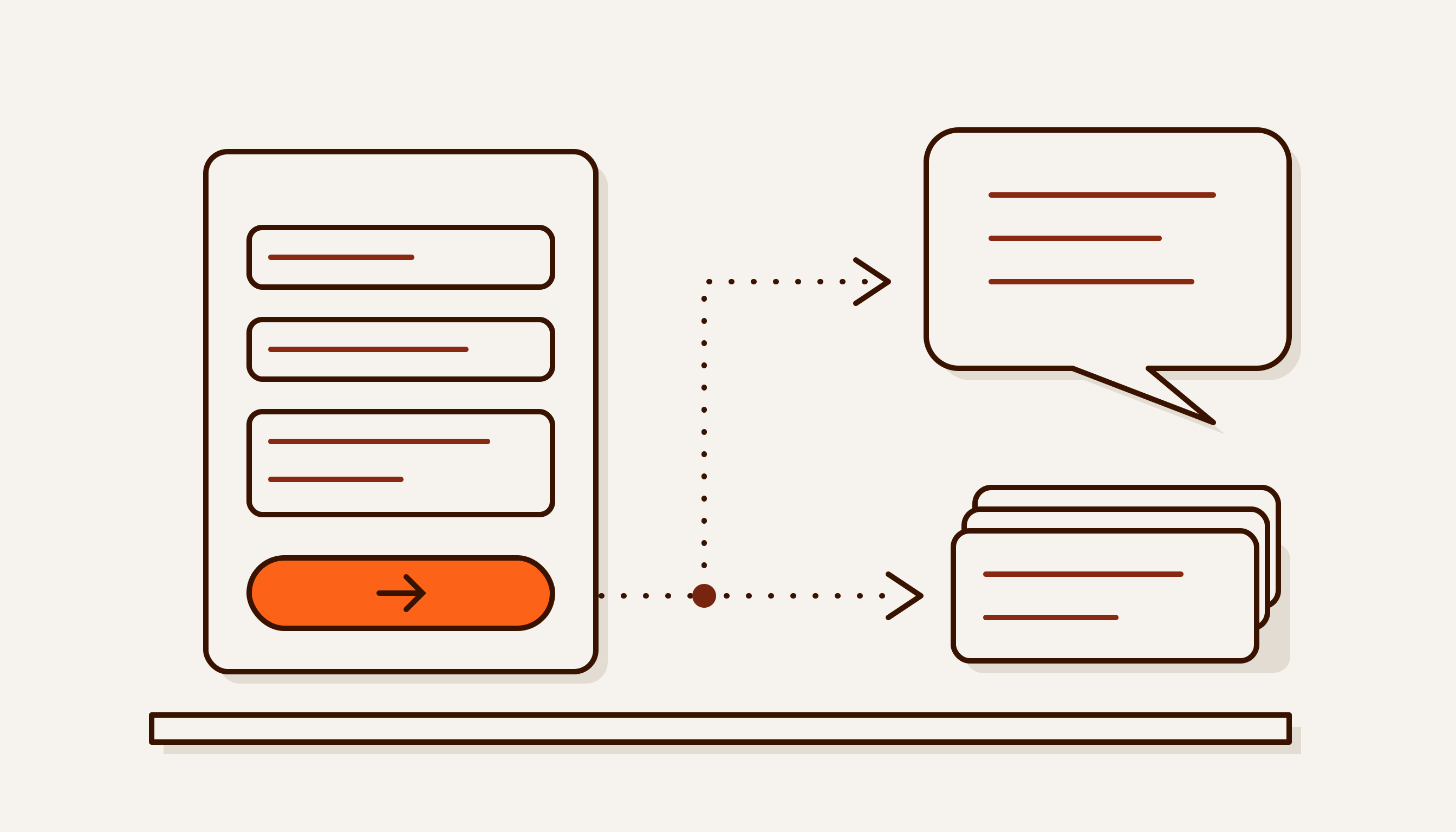
The flow is always the same: form → middle layer → bot → a manager’s chat or a group. What differs is who the middle layer is and where the token lives.
| Method | What you need | Where the token is | Copy of the lead | Best for |
|---|---|---|---|---|
| Tilda’s built-in integration | Keys from the @tildaformsbot bot | With Tilda, you never see it | The Leads section — 1 month by default; you can also connect email or Google Sheets to the form | Sites on Tilda |
| WordPress plugin | Your own bot, a plugin | In the site settings on the server | Contact Form 7 doesn’t store submissions — use email or the Flamingo plugin | WordPress sites with Contact Form 7 |
| Your own server-side handler | A bot, PHP or Node.js code, or a cloud function | In the server’s environment variables | You build it — database, spreadsheet, CRM | Custom-coded sites with their own hosting |
| Google Apps Script | A bot, a Google Sheet, about 35 lines of code | In the script properties | A row in the sheet, free | Custom-coded sites without a server |
A fifth option is a workflow builder such as n8n or Make. It receives the form through a webhook and sends the lead to Telegram, a spreadsheet and a CRM at once. That makes sense when a lead triggers more than two actions. We explain how these tools work in “n8n explained in plain words”.
Tilda. Open the @tildaformsbot bot and press START — it sends you an API key and a Secret key. Paste them into Site Settings → Forms → Telegram, tick “Telegram” in the form block’s settings and publish the page (Tilda help). To send leads to a group, add the bot to the group and type /start there. The group’s API key, the help page warns, will be negative — that’s normal. Tilda wants separate keys for each project. How long the Leads section keeps submissions is set in Site Settings → Forms → General form settings: 1, 7, 60 or 90 days (Tilda help).
WordPress. For Contact Form 7 there is, for example, Message Bridge for Contact Form 7 and Telegram: it forwards form submissions to chats through your bot. As of 30 October 2026 it has more than 10,000 active installations (wordpress.org). You enter the bot token in the plugin’s settings in the admin panel and connect the chat following the instructions on the plugin page. Before installing, check when it was last updated and whether it supports your WordPress version.
The bot and the chat ID: five steps
You need these steps for a plugin, your own handler and Apps Script. On Tilda, the builder’s bot handles them.
- Create a bot with @BotFather using /newbot. Do it from the company’s or the owner’s account, not the contractor’s: whoever created the bot controls it.
- Decide where leads go. A private chat works if one person handles leads. Use a group if two or more do: everyone sees the lead and who took it, and when someone leaves the company you just remove them from the group. In a group with topics you can send leads to a dedicated topic using the
message_thread_idparameter ofsendMessage(Bot API). - Press START in the bot’s chat or add it to the group. A bot can’t write first (Telegram).
- Find the chat ID. In a private chat, send the bot any message; in a group, send
/start@your_bot_name, because by default the bot doesn’t see ordinary group messages (privacy mode). Then openhttps://api.telegram.org/bot<token>/getUpdatesin a browser and look for"chat":{"id":…}in the response. A group ID starts with a minus sign. If the response is empty, check whether the bot has a webhook set up: getUpdates doesn’t work while one is active (Bot API). Do this on your own computer and don’t share the link with the token in messengers. - Send a test lead and check that the message arrived and every field is readable.
A useful message fits on one screen and starts with what a manager needs to make the call:
New lead — “Quote” form
Name: Dilshod
Phone: +998901234567
Needs: custom kitchen, 3.2 m
Page: /kuhni/
A phone number on its own line is easier to copy and dial. The page the lead came from tells the manager what the conversation will be about. Telegram shows the time of the message on its own.
The main mistake: a token in the page code
A common mistake in home-made forms is calling Telegram straight from JavaScript in the browser, something like fetch('https://api.telegram.org/bot…/sendMessage') inside a <script>. The bot token then sits in the page code, and any visitor can see it with “View source”. Telegram says plainly that anyone who has the token can use it to control your bot (Telegram). In practice, a stranger can post anything to your work chat in the bot’s name.
The right setup: the browser sends the form to the middle layer, and the middle layer calls https://api.telegram.org/bot<token>/sendMessage. The token lives in the server’s environment variables or the script properties, never in files inside the site’s public folder.
If the token has already leaked — in the site code, in a chat with a freelancer, in a public repository — issue a new one with the /token command in @BotFather (Telegram). The old token stops working, so replace it in the middle layer right away.
The middle layer’s own address is also visible in the page code. Anyone can send it a request, and the bot will forward it to the chat. The next section covers how to protect against that.
The lead didn’t arrive: a copy, errors and spam
Telegram is a notification channel, not storage. A message may fail: the token was changed, the bot was removed from the group, the server lost its connection. On an error, Telegram returns "ok": false and gives the reason in the description field. If you hit the rate limit, the response includes retry_after — how many seconds to wait before retrying (Bot API). If the middle layer doesn’t check the response, the lead disappears silently.
So the middle layer should work in this order:
- Check that the lead looks real: the phone is filled in and looks like a number.
- Save a copy — a row in Google Sheets, a deal in the CRM or an email.
- Send the message to Telegram.
- If Telegram returns an error or doesn’t answer at all, mark the row and email the person responsible so someone calls the client by hand.
Here is what that looks like in Google Apps Script. It extends the lead receiver from “A CRM in Google Sheets”, which covers deploying the web app and why the form must send its request as text/plain.
The code cuts the “Needs” field to 3,000 characters and the name and page address to 200 and 300: a single bot message holds at most 4,096 (Bot API), and Telegram simply rejects a longer one.
The website field is a trap for spam bots. Add a field with that name to the form and hide it with CSS. A person won’t see it and leaves it empty, while simple spam scripts fill in every field — the script drops those submissions.
Normal lead volume won’t hit the limits. A free Google account lets a script make 20,000 external requests a day, and Google notes that quotas can change without notice (Apps Script quotas). Telegram is the tighter spot — 20 messages a minute to one group. What reaches that limit is not a flow of clients but a spam attack on a form with no checks.
Send a test lead from the site once a week. That way a breakdown shows up the same day, not after a month of silence that is easy to mistake for “no demand”. What a slow reply to a lead costs is covered in “How long a lead stays warm”.
Personal data: consent and storage
A name and phone number from a form are personal data, and sending them to Telegram and a spreadsheet is processing. Uzbekistan’s Law “On Personal Data” (ZRU-547 of 2 July 2019) defines processing as collecting, organising, storing, changing and using data, among other actions (art. 4).
Consent. Under article 21, consent may be given in any form that allows you to confirm it was obtained. For a website form, that is a checkbox or a line next to the button with a link to the privacy policy.
Storage abroad. Since 27 March 2026, article 27-1, added by ZRU-1125, has been in force. Biometric and genetic data, and data of users of telecom operators working in Uzbekistan, must be stored in Uzbekistan. Other data may be stored and processed abroad if one of these conditions is met:
- the country is on the list of states with adequate data protection, approved by the Cabinet of Ministers;
- the operator follows standard contractual clauses or binding corporate rules meeting the requirements of the authorised body;
- the operator complies with international standards from a list approved by the authorised body.
Telegram’s and Google’s servers are not in Uzbekistan. In practice: state in your privacy policy and consent text where leads go (Telegram, Google Sheets) and that these services operate abroad. If the form collects biometrics, such as a face photo, talk to a lawyer first. Other changes made by ZRU-1125 are covered in “Client chats in ChatGPT and Claude”.
Pre-launch checklist
- The bot was created from the company’s account; only the bot owner and the middle layer have the token.
- The page code has no token: search for “api.telegram.org” in “View source”.
- Leads go to a group if two or more people handle them.
- Every lead is saved to a sheet, CRM or email before it goes to Telegram.
- A Telegram error triggers an email to the person responsible.
- The form has a hidden trap field and a phone check.
- The button has a consent line linking to the policy, and the policy names Telegram and other services.
- Anyone who leaves the company is removed from the leads group the same day.
- A test lead goes out from the site once a week.
Where we stand, honestly
Leads from this site go to a Google Sheet: the questionnaire sends them to an Apps Script web app, and the request goes out as text/plain. We don’t get many leads from the site yet, and this setup is enough.
If all you need is a lead notification, you probably don’t need a contractor: on Tilda and WordPress the built-in feature or a plugin will do, and on a custom site the script from this article will. We are useful when a lead starts a chain: checks, CRM, assigning managers, replying to the client, reporting. That is our “Pipeline” package in business automation: one process end to end, up to three integrations, from $1,200 to launch plus $300 a month, with 2 weeks to launch.
We don’t have client case studies with numbers yet. If leads get lost between the site, messengers and managers, describe how it works now in the quiz on the home page: the first review is free, with an answer within 48 hours.